Pages

Sunday, January 25, 2015

Algorithms Explained : Minesweeper Game


This blog post explains most critical algorithms for well-known windows oriented game, minesweeper:


Game Rules:

  1. The board is a two dimensional space, which has a predetermined number of mines.
  2. Cells has two states, opened and closed.
  3. If you left-click on a closed cell:
    1. Cell is empty and opened. 
      1. If neighbour cell(s) have mine(s), this opened cell shows neighbour mine count.
      2. If neighbour cells have no mine, all neighbour cells are opened automatically.
    2. Cell has a mine, game ends with FAIL.
  4. If you right-click on a closed cell, you put a flag which shows that "I know that cell has a mine".
  5. If you multiclick (both right and left click) on a cell which is opened and has at least one mine on its neighbours:
    1. If neighbour cells' total flag count equals to this multi-clicked cell's count and predicted mine locations are true, all closed and unflagged neighbour cells are opened automatically.
    2. If neighbour cells' total flag count equals to this multi-clicked cell's count and at least one predicted mine location is wrong, game ends with FAIL.
  6. If all cells (without mines) are opened using left clicks and/or multi-clicks, game ends with SUCCESS.
Data Structures:

We may think each cell as a UI structure (e.g. button), which has following attributes:
  • colCoord = 0 to colCount
  • rowCoord = 0 to rowCount
  • isOpened = true / false   (default false)
  • hasFlag    = true / false    (default false)
  • hasMine  = true / false    (default false)
  • neighbourMineCount  0 to 8  (default 0, count of total of mines on neighbour cells)
So, we have a two dimensional "Button[][] cells" data structure to handle game actions.

Algorithms:

Before Start:
  1. Assign mines to cells randomly (set hasMine=true) .
  2. Calculate neighbourMineCount values for each cell, which have hasMine=false. (this step may be done for each clicked cell while game continues but it may be inefficient)
Note1: Neighbour cells should be accessed with {(colCoord-1, rowCoord-1),(colCoord-1, rowCoord),(colCoord-1, rowCoord+1),(colCoord, rowCoord-1),(colCoord, rowCoord+1),(colCoord+1, rowCoord-1),(colCoord+1, rowCoord),(colCoord+1, rowCoord+1)} coordinates. And don't forget that, neighbour cell counts may be 3 (for corner cells), 5 (for edge cells) or 8 (for middle cells).

Note2: It's recommended to handle mouse clicks with "mouse release" actions instead of "mouse pressed/click" actions, otherwise left or right click may be understood as multi-clicks or vice versa.

Right Click on a Cell:
  • If cell isOpened=true, do nothing.
  • If cell isOpened=false, set cell hasFlag=true and show a flag on the cell. 
Left Click on a Cell:
  • If cell isOpened=true, do nothing.
  • If cell isOpened=false:
    • If cell hasMine=true, game over.
    • If cell hasMine=false:
      • If cell has neighbourMineCount > 0, set isOpened=true, show neighbourMineCount on the cell. If all cells which hasMine=false are opened, end game with SUCCESS.
      • If cell has neighbourMineCount == 0, set isOpened=true, call Left Click on a Cell for all neighbour cells, which hasFlag=false and isOpened=false.
Note: Last step may be implemented with recursive call or using a stack data structure.

Multi Click (both Left and Righ Click) on a Cell:
  • If cell isOpened=false, do nothing.
  • If cell isOpened=true:
    • If cell neighbourMineCount == 0, no nothing.
    • If cell neighbourMineCount > 0:
      • If cell neighbourMineCount != "neighbour hasFlag=true cell count", do nothing.
      • If cell neighbourMineCount == "neighbour hasFlag=true cell count":
        • If all neighbour hasFlag=true cells are not hasMine=true, game over.
        • If all neighbour hasFlag=true cells are hasMine=true (every flag is put on correct cell), call Left Click on a Cell for all neighbour cells, which hasFlag=false and isOpened=false.

Note: Last step may be implemented with recursive call or using a stack data structure.


Wednesday, February 26, 2014

Software Version Controlling Best Practices


Always use version controlling
Use version controlling/source control even if one developer exists. This issue brings change tracking and versioning of the application continuously. For multi developers, it brings more benefits like co-working on same files and fast codebase updates.

Do not commit halfdone work

Each commit should consist of a complete task (issue, bugfix, etc.). Partial commits may cause unfunctionality, crash of application or even compilation errors.

Full Update -> Build -> Run -> Full Commit rule
For having no trouble, a stable version controlling process should be applied. According to this process, you should full update the code, then build and run your application. If application runs correctly, you should commit all of your updated files. While committing, inspect all of your changed files and changes. If all team members apply this process, application will always continue to run and no one will prevent others work. 

Commit atomicity/granularity
Do not use version controlling system to backup each single file separately and do not commit hundreds of files after days or weeks of development. Commits should be atomic, and as a best practice, should include files which are related with only one task. Late commits also brings more conflicts.

Use descriptive commit messages
Commit messages are important for tracking changes. Descriptive commit messages help developers to control old versions of code within a functional context, instead of date and time only.

Don't commit generated files
Use "ignore" funcionalities of your version controlling tool to ignore commiting and updating of generated files (e.g. target folders, user settings, IDE generated files, generated classes after each build etc.) By doing this, you will not waste your time for managing those unstable/unimportant files.

Continuous integration
Use continuous integration along with version controlling. By doing that, perform automated builds and deploys to a specific location. Also, configure the tool to create a separate version number (with a predefined versioning algorithm, e.g. <major_changes>.<minor_changes>.<bug_fixes>) for each build. This will be useful to trace tests and deployments.

Use qualified version controlling tools and plugins (especially for merge)
Version controlling tool quality is also important. It must at least show changed files clearly, give ability to merge conflicted files easily and view old versions of files. Besides, it will be better to have a branching function to manage versions and and issue tracking system synchronization to manage issue-related code file matchings.

Use branches for testing and different lines of code
You should use different code branches for development, testing and also production. If a version of code is being tested, development should not continue on that branch. Development can continue on another branch and when a new version will be tested after fixing some bugs and adding new properties, a new test branch should be provided with a new version. When a stable test branch is reached, it may be released as a production branch.


You can also take a look at the below link for version controlling basics:
http://betterexplained.com/articles/a-visual-guide-to-version-control/


Monday, April 22, 2013

A Theorical Look into Object/Resource Pool Pattern


Definition:
Sometimes our software projects need costly object creations (database connections, socket connections, large graphical objects etc.). This cost may be about time and/or memory. Those objects may also be needed to be created frequently. At that moment, Object/Resource Pool pattern comes to help.

Object Pool pattern:
  • Reuses unused costly objects without re-creating those objects (e.g. books in a library).
  • May create objects eagerly before they are needed, to manage application performance.
  • May limit created number of objects to manage application performance and user access.

Working principle:
Object Pool Class Diagram
Client requests an object (Reusable) from object pool. Object pool has a list of predefined reusables and gives an available one from pool. For the client's point of view, given reusable is a new object but it is probably (object creation strategies will be told later) a pre-created object with a new object's field values. For the optimum performance, client should notify object pool when reusable is no longer needed. Just in case client doesn't notify, object pool may define a timeout for each created reusable. Object pool must also have a synchronization mechanism for reusable serving, especially on multithreaded or multiuser applications.

When to use/Trade offs:
If objects are not costly, object pool pattern should not be used because this pattern needs clients to inform object pool (brings extra code complexity) and object creation management code (synchronization of pool, object creation limitation strategy etc.). This extra management code also brings a little performance loss. If performance gain of reusable object usage is bigger than extra management code performance loss, and application must frequently create those reusable objects, object pool pattern is recommended to be used.

Implementation Strategies:
    Object pool limit:
  • If memory is limited and/or maximum number of clients are needed to be restricted, an object number limit value may be defined for object pool (limited pool).
  • If there is no restriction, limit value is not needed (unlimited pool).
  • If all object pool list is in use, new objects may be created (expanding pool) or client may be enforced to waiting (fixed pool).
   Eager/lazy creation:
  • If application startup is performed infrequently and startup time is not very important, object pool list objects may be created at the startup (eager ceration).
  • If no restrictions exist, no objects are needed to be created eagerly (lazy creation).
  • Some number of objects may be created eagerly, others may be created lazily according to the application parameters (mixed creation).
    Empty object pool strategy:
  • If object pool is expanding, create a new object and return it.
  • If object pool is not expanding, return null or enforce client to wait until an object is ready to be given.
    Synchronization strategy:
  • Object pool should have a synchronization mechanism for object serving. Otherwise, especially on multiuser systems, pooling system may fail.
    Unused object strategy:
  • Usage of the pool objects may be lower than expected in some cases. Object pool may have a pool object removing strategy (i.e. descreasing object limit) for increasing performance.
    Returning object strategy:
  • Clients should return pool objects back to the pool after their job is completed. But pool code can't control this and poor client code may return pool objects. For this situation, object pool may have a timer mechanism for given but unused pool objects.

According to the project requirements, some of those strategies or mixed versions should be selected and implemented for object pool. But "reusing available objects" principle is the key and can not be changed for any implementation strategy.

Example Implementations will exist on the next post.

Wednesday, February 20, 2013

Layers of a Standard Enterprise Application


In a standard enterprise application which has a database and graphical UI (web or desktop), there are some typical layers which constitute the application. In this article we will mention those layers and give some instructions about them. 

The general diagram is as below:


There are some important properties about that diagram: 
There are vertical and horizontal layers. Vertical layers may be thought as general application service libraries which can paralelly work on all horizontal layers and independent from each other. However, a horizontal layer's subject of interest is only its neighbour (top and bottom) horizontal layers, and they work sequentially from top-to-bottom and bottom-to-top. Lastly, user can only interact with topmost horizontal layer. 

Horizontal layers:

  • Presentation: Every enterprise application has a UI, in fact graphical UI. This UI can be web or desktop based, which doesn't matter. The rule is simple. UI takes user action and sends it to the controller. And at the end it shows result taken from controller to the user. UI can be implemented according to MVC, MVP, MVVM or another approach.
  • Control: Handles business logic of the application. Takes info from user and sends it to DB layer (DAO or ORM framework) and vice versa. Abstraction type of controller may vary (a separate control and business layers for example)  according to the application parameters or development patterns (MVC, MVP, MVVM, ...) but the main idea remains the same.
  • Data Access: Database handling layer of the application. It may contain entity definitions, ORM framework or DB connection codes having SQL sentences, according to the abstraction decision. Its role is getting data from controller, performing data operation on database and sending results again to controller (if result exists). Database independence is a very important plus for this layer, which brings flexibility.

Vertical layers:

  • Security: Security is a general concept, which includes user authorization, user authentication, user role management, network or SQL injection attack prevention, data recovery etc but we grouped that items generally as "Security". Those issues must be handled for each horizontal layer if you want to have a fully secure software.
  • Logging: Logging is very important for maintenance and reporting in enterprise applications. An easily configurable, parameterized, readable, flexible and correctly implemented logging layer for all horizontal layers is very useful for both developers and users. 
  • i18n: i18n (internationalization) brings multiple language support and user interface text changing capability without rebuilding code. It may also have localization property which can handle number, currency and date formatting. So i18n provides flexibility on applications and should not be ignored.
  • Exception Handling: Exception handling may also be included in "Security" or "Logging" layers. We should not use only general exception classes or absorb all exceptions if we want to develop a quality software. We sometimes need our special exception classes with their specific behaviours for better security, logging and application performance.

If you design an architecture which has that layer structure considering software quality factors (which are told here), you will probably have a successful enterprise software application.

Wednesday, February 6, 2013

10 Groups of Software Quality Factors That Should Always Be Remembered


Flexibility and Extensibility: 
Flexibility is the ability of software to add/modify/remove functionality without damaging current system. Extensibility is the ability of software to add functionality without damaging system, so it may be thought as a subset of flexibility. Those functionality changes may occur acoording to changing requirements, or an obligation if development process is one of the iterative methods. Change is inevitable in software development and so, this is one of the most important properties of quality software.

Maintainability and Readability:
Maintainability is a little similar with flexibility but it focuses on modifications about error corrections and minor function modifications, not major functional extensibilities. It can be supported with useful interface definitions, documentations and also self-documenting code and/or code documentation. The more correct and useful documentation exists, the more maintainability can be performed.

Performance and Efficiency:
Performance is mostly about response time of the software. This response time should be in acceptable intervals (e.g. max. a few seconds), and should not increase if transaction count increases. And also, resources are expensive. Efficiency must be supported with resource utilization. As an exaggerated example, ability of performing a simple function only by using a 32 processor machine or 1 TB disk space is not acceptable. Optimal source/performance ratio must be aimed. 

Scalability:
A scalable system responds user actions in an acceptable amount of time, even if load increases. Of course more hardware may be added for handling increasing user transaction, but the architecture should not change while doing this. This is called vertical scalability. Ability of running on multiple, increasing count of machines is multiple processing. If the software can perform that type of processing, this is called horizontal scalability. A preffered scalable system should suit both of these methods.

Availability, Robustness, Fault Tolerance and Reliability:
A robust software should not lose its availabilty even in most failure states. Even if some components are broken down, it may continue running. Besides, even if whole application crashes, it may recover itself using backup hardware and data with fault tolerance approaches. There should always be B and even C, D .. plans. Reliability also stands for the integrity and consistency of the software even under high load conditions. So it is relevant with availability and scalability. An unreliable system is also unscalable.

Usability and Accessability:
User interfaces are the only visible parts of software according to the viewpoint of user. So, simplicity, taking less time to complete a job, fast learnability etc. are very important in this case. The most well known principle for this property is KISS (Keep It Simple Stupid). Simple is always the best. A usable software should also support different accessibility types of control for people with disabilities.

Platform Compatibility and Portability:
A quality software should run on as much various platforms as it can. So, more people can make use of it. In different contexts we may mention different platforms, this may be OS platforms, browser types etc. And portability is about adapting software that can run on different platforms, for being more platform compatible. In this sense, portability is also related with flexibility.

Testability and Managability:
Quality software requires quality testing. Source code should be tested with the most coverage and with the most efficient testing methods. This can be performed by using encapsulation, interfaces, patterns, low coupling etc. techniques correctly. Besides testability, a qualified software should be manageable after deployment. It may be monitored for e.g. performance or data usage status, or may enable developer to configure system easily. Creating a successful logging system is another very important issue about managability.

Security:
Security is a very important issue on software development, especially for web or mobile based ones which may have millions of users with the ability of remote accessing to system. You should construct a security policy and apply it correctly by leaving no entry points. This may include authorization and authentication techniques, network attack protections, data encryption and so on. all possible types of security leaks should be considered, otherwise one day only one attack may crash your whole applicaion and whole company.

Functionality and Correctness:
Functionality (or correctness) is the conformity of the software with actual requirements and specifications. In fact this is the precendition attribute of an application, and maybe not a quality factor but we wanted to point that as the last quality factor, for taking attention: Quality factors are not meaningful when we are talking about unfunctional software. First, perform desired functionality and produce correct software, then apply quality factors on it. If you can perform both paralelly, it is the best.

Monday, January 14, 2013

A Serverless, Zero-Configuration Database Solution : SQLite


Most software need saving data. Sometimes that data is predicted to be small and hundreds or thousands of transactions on it will not be needed at the same time. But you will need some SQL-like operations on that data, because some modifications can be difficult and time consuming with regular file operations. At that time, SQLite becomes a very practical solution to this situation.

It started as a C/C++ library (on http://www.sqlite.org/) but it also has Xerial jdbc project for Java (on http://www.xerial.org/trac/Xerial/wiki/SQLiteJDBC and https://bitbucket.org/xerial/sqlite-jdbc lastly). We will tell some details of Java JDBC project here. Some critical properties are:

  • You need only one jar file and adding it to the classpath.
Download latest jar (from here: https://bitbucket.org/xerial/sqlite-jdbc/downloads) and add to the classpath. 
  • Needs one line of code to start using.
Class.forName("org.sqlite.JDBC"); line is enough for activating driver.
  • It creates one database file per schema at the place which you will determine.
Connection con = DriverManager.getConnection("jdbc:sqlite:mydb.db"); line creates "mydb.db" file as database file on the root of your project and creates a connection for DB operations.
  • Supports a general formed JDBC SQL syntax with a useful JDBC API.
Some code examples are shown below (connection opening/closing statements are not included each time for simplifying statements):

  1. // opening connection
  2. Connection con = DriverManager.getConnection("jdbc:sqlite:person.db");
  3. Statement stat = con.createStatement();

  4. // closing connection
  5. con.close();
  6.  
  7. // creating table
  8. stat.executeUpdate("create table person(id INT, name varchar(30));");
  9. // dropping table
  10. stat.executeUpdate("drop table if exists person");
  11. // inserting data
  12. PreparedStatement prep = con.prepareStatement("insert into person values(?,?);");
  13. prep.setInt(1, 1);
  14. prep.setString(2, "andy brown");
  15. prep.execute();
  16. // selecting data
  17. ResultSet res = stat.executeQuery("select * from person");
  18. while (res.next()) {
  19.      System.out.println(res.getString("id") + " " + res.getString("name"));
  20. }
  21. // updating data
  22. PreparedStatement prep = con.prepareStatement("update person set name = ? where id = ?;");
  23. prep.setString(1, "andy black");
  24. prep.setInt(2, 1);
  25. prep.execute();

For more detailed examples about SQL syntax, please take a look at:
http://docs.oracle.com/javase/tutorial/jdbc/index.html

Thursday, December 13, 2012

10 Software Process Management Best Practices


Regardless of software process management type (waterfall, scrum, iterative etc.), there are some main rules which should be considered about software process management. In this post we will mention most important of these practices theorically:


1. Define roles and tasks of team members:
For productivity, roles of team members should be defined clearly. These roles may be project manager, team lead, develeoper, tester etc. Furthermore, authorizations and responsibilities of these roles should be defined very clearly. Task-assignment based development should also be applied for avoiding redundant effords and chaos. 

2. Define meeting types:
Meetings are very important if we are talking about software process management and should be defined in detail (meeting participants, context, average duration etc.). Team members should also obey meeting rules. This will bring more productive meeting and development process, and will avoid losing time unnecessarily.

3. Define documentation strategy:
Every single software process has a documentation strategy, even agile or extreme methods (backlogs, lessons learned info, bug items etc.). These documentation types should be defined clearly (document physical properties, standard sections, document update period, version numbering etc.) for consistency, understandability and more effective software production. 

4. Define software quality metrics and measure them:
There are so many metric types (line of code, cyclomatic complexity etc.) in software world. According to the properties of your software type, some of these should be chosen to measure quality and growth of code. These info may be discussed periodically and production quality will be increased after assessments.

5. Perform issue/requirement tracking:
Requirement management or issue tracking is one of the key points in software development. They determine the scope of software, also supports a traceability base for functional tests. Those issues/requirements are preferred to be saved and managed with useful tools which have more features than text editing.

6. Perform version controlling:
Version controlling is also crutial in production. This should include code and other documents. It will support co-working on code, returning to older versions of code and will ease versioning and dependency management. Versioning strategy (version numbering,versioning periods etc.) should also be determined clearly to obtain consistency.

7. Perform testing:
Testing is one of the main phases of software development. Unit testing must be performed for every type of software, except a few exceptions like some user interface code. Other testing types (system, user, integration etc.) should be defined clearly and applied consistently as defined. This will increase quality of production and decrease bugs.

8. Perform dependency management:
As software projects grow, more external libraries (jar, dll, ...) or projects (external projects or internal company projects) are included. If those items are added to projects imprecisely, later updates or version changes will bring chaos and so much time consumption. Dependency management strategies and tools should be used for efficient productivity.

9. Perform code reviews frequently: 
Code review brings high quality code. First of all it enforces developer to produce better code, because it will be controlled by others. Besides, a junior developer will learn better coding quickly by corrections of senior developers. So, code review is a partial type of pair programming and it enhances productivity.

10. Save "lessons learned" info for your projects:
Even if there are experienced staff in projects, there may be unforeseen events which may obstruct or retard development process. This can be a complex item configuration, error, production experience etc. Those happenings are highly preferred to be written in "lessons learned" documents and shared in public locations. This will avoid recurrence of time loss and provide more productive software.

Friday, November 30, 2012

Software Unit Testing and Best Practices


Software Unit Testing is about testing of individual units of source code. Those units are generally methods and they are grouped by class names (called as Test Case). 


For example, if you have an XYZUtility class which having methodA, methodB, methodC methods, you will potentially have an XYZUtilityTestCase class having methodATest, methodBTest and methodCTest tests.

Unit tests must cover as much code as they can while running, but it is not the primary purpose. Code coverage is prefferred to be high as a result but the main purpose of the unit tests are:
  • Testing output of a function with specific inputs. Those inputs must include boundary (min/max) values and potential exceptional values (divide by 0 etc.). And the inputs are also preffered to be chosen for covering all condition cases of the method.
  • Documenting the software. One of the self-documenting code development techniques is unit testing. It shows usage of the code section.
  • Increasing modularity, flexibility and extensibility of the code along with concerning the developer with the interface before implementation, in Test Driven Development (TDD) approach.
There are also 5 important properties for unit tests that must be obeyed according to Andy Hunt's Pragmatic Unit Testing book.

  • Automatic
Unit test results (pass/fail) must be controlled automatically with tools. And generally more than one tests are need to be run together. A test should not have a manual step which stops execution of all tests.
  • Repeatable
A unit test must be repeatable. In other words, if it passes on a certain version of code, it must always pass with that code or if it fails on a certain version of code, it must always fail with that code. Database changes or other external services or files etc. should not change the result of the unit test.
  • Independent
Unit test results must be independent of other unit tests. If a unit test result changes after changing the running order or other environment change (database data etc.), it can not be called as a unit test.
  • Thorough
A unit test must control every condition as it can (all possibilities, exceptions, boundaries ...). Its code coverage must be as much as it can and controlled conditions are preferred to be logical and functional.
  • Professional
Unit test code must obey coding standards of the project which it belongs to, because it also is  a professional code. Furthermore, it was stated before that unit test is another way of self-documenting code. Clean and understandable unit test code will bring better documentation.

As a last word, for providing repeatable and independent unit tests, using mock objects is a good practice. Mock objects replaces the external sources (database, services, etc.) and returns predefined results. A good object oriented design having required amount of interfaces will  simplfy the creation of mock objects. You can also use some API's like EasyMock or Mockito. 


Friday, November 2, 2012

10 Software Documentation Best Practices


  1. Perform documentation as required (e.g. %10 of total production time). No documentation is never a good solution as much as excessive documentation. It may include code documentation, requirement specifications, design documents, test documents, user manuals etc. Those documents are needed to be managed and shared also, by using version controlling tools and/or web based platforms.
  2. Code documentation is important. Best way of doing this is producing self-documenting code. Variable, method, class, package etc. names must be meaningful and codeflow must be pure. For very complex code sections, short comment lines may be included. Javadoc-like standard entries are not required but may be added for auto document generation from code.
  3. For the future developers, short and useful design documents may be prepared including key design features and UML diagrams. Practical user help documents may be useful also. These documents must not include unnecessary bulk info.
  4. Requirements/issues/backlog item/function points tracking is important. For that operation, a tracking tool is more effective (it will have quick search, edit capabilities and a few more features) than writing them into a plain text file.
  5. Test tracking is also important. Test scenarios and results may be tracked using tools (or with text files, which is not preferred) and associated with related requirements. By doing this, functional status of software may be monitored easily.
  6. Documentation is a live process. If you produce some documents, it is a good practice to update or produce new version of those documents until the end of development process. If a document is not up-to-date, it is practically worthless.
  7. For text file documents, versioning is important. For each new version of a document, a new version number (which is given with a stable versioning strategy) must be given. Also a version tracking table having change info may be included for better tracking.
  8. Having a consistent document template is important for companies. Header, footer, headings, font sizes must be consistent in document and among other documents for better readability. It is also a good practice that having a cover page, table of content, table of pictures and a glossary for documents.
  9. Document formatting, language usage and typing are other physical issues about documents and attention must be paid. Typing errors, unconsistent table sizes, indentations etc. will distract the reader.
  10. Saving "lessons-learned" info on a shared place is another good practice. Those items are some useful experiences (information or code/configuration sections etc.) about development process which may not be included in standard process documents. Lessons-learned info may give acceleration to the current developers or future developers about some challenging and repeating operations.

Thursday, October 18, 2012

Best Must-Read Books for Software Engineers


Here are the CodeBuild selection of must-read software engineering books. Books are grouped according to their content with some description.

  • Reference Books
These Robert C. Martin and Gang of Four books are very fundamental OOP resources for every software engineer.

    
  • Coding Perfection
These Steve McConnell, Robert C. Martin and Joshua Bloch books are very helpful with increasing your coding skills.


  • Refactoring and Patterns
Refactoring and patterns are very important issues of OOP, which brings quality and maintainability. These Martin Fowler and Joshua Kerievsky books are maybe the best references about this issue.


  • Pragmatic Programming
Andrew Hunt's and David Thomas's "pragmatic" approach to programming brings very important viewpoints to software engineering.


  • Project Management
There are many project management books in the market but  Frederick P. Brooks Jr. and Tom DeMarco presents very impressive important viewpoints to project management.


Monday, October 15, 2012

Start Android Development in 5 Minutes


Android OS is the most popular mobile OS nowadays (leading market with %46.9 above iOS's %18.8). Besides, globally over %20 of computers are mobile devices. So, over %10 of people in the world uses Android OS and softwares related with it. For this reason, Android application development is a very important issue for developers and software engineers. 

This post will describe a fast (5 minutes, excluding tool download periods) and simple startup of an android project on Eclipse IDE, for developers who deal with the matter.

1. JDK and Eclipse IDE:

Download and install appropriate JDK for your computer and OS (JDK 6 or 7 are preferred)

Download latest Eclipse distribution, unzip it to your computer.

2. Android SDK:

Download and install android SDK:

Run Android SDK and install some API (e.g. 8, 14, 16, ...). Android distributions have various APIs and your application API must be compatible with your device. This step may also be performed using Eclipse ADT plug-in Android toolbar buttons. For each API, "SDK Platform" is required. "SDK Tools" and "SDK Platform Tools" under "Tools" menu and "Android Support Library" under "Extras" menu should be installed for general usage.


Don't forget to set your Android SDK directory on Eclipse Window --> Preferences:


3. Eclipse ADT Plugin:

Start Eclipse. Click Help --> Install New Software, paste adress below and click OK:


Select "Android Development Tools" from "Developer Tools", click "Next" various times and finish installation.

You will see Android SDK (which performs installing different APIs as told in step 2) and Android emulator buttons on the top panel. You can also start Android projects from now on.


4. Android Emulator:

Android SDK includes a useful emulator for testing. After installing ADT plug-in, you can start emulator by "Android Virtual Device Manageer" button from toolbar. After that you may add one or more android devices with different API and system configurations.


You can have detailed info about emulator usage and command line parameters here:

5. Creating Project:

Select File --> New --> Project --> Android Application Project. You can also start an Android Sample Project for exercising. 


You must select "Build SDK" and "Minimum Required SDK" while creating project. 


After that right click your project and select "Run". Your project will run on selected emulator.

After this short and simple start, you may want to look at these:


Thursday, September 27, 2012

5 Common Automized Software Quality Metrics (with Pros & Cons)


1. Source Lines of Code (SLOC)
Counting lines of code is probably the most simple method. It mostly indicates the scale of the software and gives an input for project growth and planning. For example, if we get SLOC count once a month, we may sketch a graph of project growth. Of course this is not reliable due to refactoring and design phases but may give a viewpoint.

SLOC may be counted as Source Logical Line of Code (SLLOC) for better info. Logical code lines does not include empty lines, one char brackets and comment lines. You can easily calculate SLLOC using tools like Metrics. 

Line of code should not be used for evaluating developer performance. This may cause duplicate, unmaintainable and unprofessional code.


2. Bugs per code_section/module/time_period
Bug tracking is essential for better testing and faster maintainability. If bugs are tracked, bugs per code section, module or specific time period (day, week, month etc.) may be calculated easily by reporting tools (e.g. Mantis). If this value is obtained, bug causes may be noticed and intervened early.

Bug count may be used as one of the inputs of evaluating developer performance, but attention must be paid. If it is most important evaluation method, software developers and testers may become enemies. In a productive company, all employees must be coherent with each other.

For better evaluation, bugs may be classified as low, medium, high etc. for weighting, because their importance and resolving costs are not the same. 


3. Code Coverage
Code coverage states the degree to which the source code of a program has been tested. Automaticity of code coverage calculation is a plus. There are so many tools which perform that operation (e.g. Cobertura). 

Code coverage does not represent the whole quality of unit tests, but may give some info about test coverage. It may be used as a software metric together with a few other test metrics. Also unit test codes, integration test scenarios and results should be reviewed frequently.

4. Design/Development Constraints
There are so many design constraints and principles for software development. Some of them are:
  • Class/method length,
  • Number of methods/attributes in a class,
  • Method/constructor parameter counts,
  • Magical number, string usage in code files,
  • Comment lines percentage etc.
These are important for code maintainability and readability. Development teams may choose a few (or all) of those metrics and follow them with automized tools (like maven pmd plugin). This will raise the quality of produced software.


5. Cyclomatic Complexity
We separated cyclomatic complexity from other design/development constraints because its concept is a bit different. Cyclomatic complexity is about the detailed implementation and code execution. It also may be calculated automatically with tools like pmd.

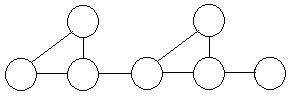
It is calculated as "the count of the number of linearly independent paths through a source code section". For example, if there are a path diagram of a source code section as below:


Cyclomatic Complexity = E(edges) - N(nodes) + 2P (exit nodes)
So, Cyc.Cmp. = 8 - 7 + 2*1 = 3

You can also see that there are 3 different paths from leftmost node to rightmost node. This value can be calculated especially for methods, using the whole method source as the execution path. Some upper limit numbers (6, 8 or 10 etc.) may be defined according to the project type.

Only one metric does not detect the quality of your whole project or solve everything. If you use more metrics, you will have more viewpoints about the quality of your project.